
Getting started
Overview
PikaMd is a public, community library for the Markdown files that shape how AI agents work: rules files such as CLAUDE.md and AGENTS.md, skills, prompt templates, subagent definitions and guides.
Good guidelines take weeks to refine, and most of them stay in one person's project folder. PikaMd makes them easy to share, find and reuse. Authors keep the credit, recorded on Arc, and the platform takes no fee.
The library
Browse, search and read every published guideline. No account needed.
Your collection
Save the guidelines you trust. Your collection is tied to your wallet.
The MCP server
Connect your agent once and it reads the library and your collection directly.
PikaMd is for developers who work with Claude Code, Cursor, VS Code, Codex or any other MCP client, and for anyone who has written a guideline worth sharing.
Getting started
Quick start
Five steps from your first visit to an agent that uses the library.
- 01
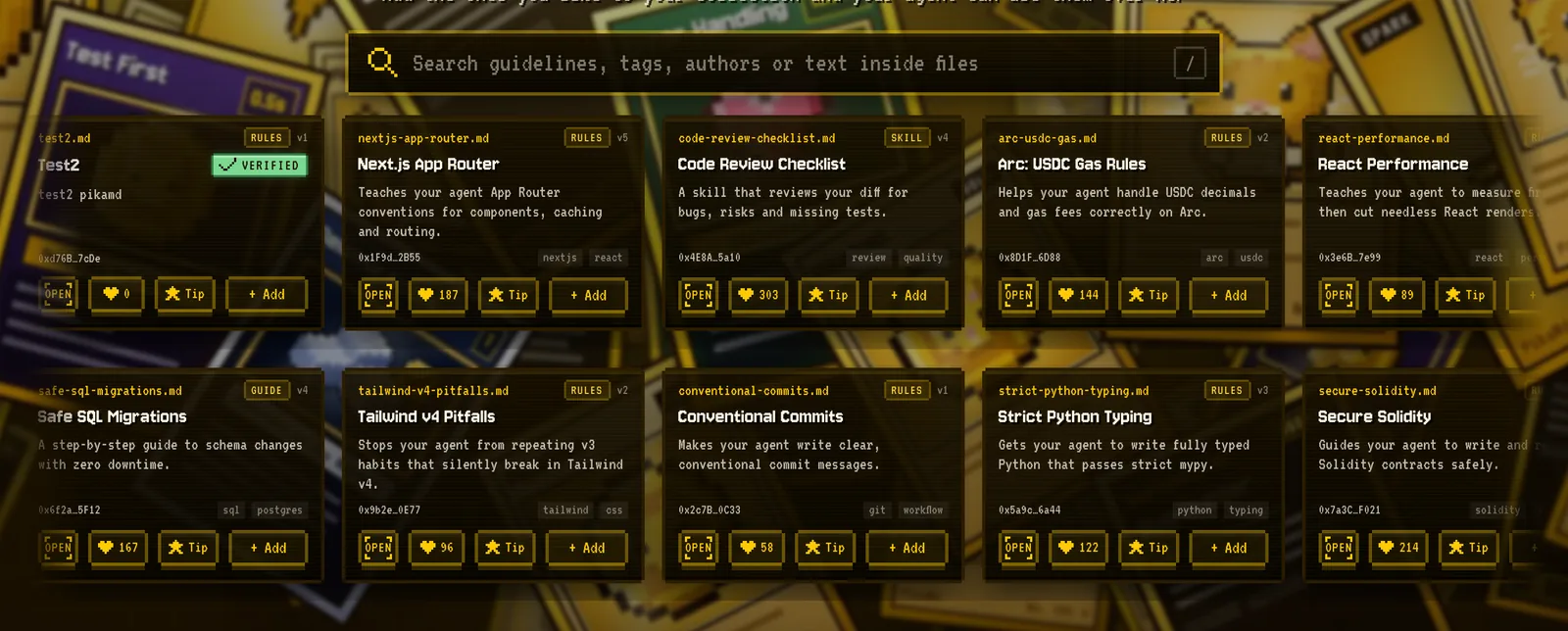
Find a guideline
Open Explore, search by topic or tag, and press OPEN on a card to read the whole file. - 02
Save it
Press Connect Wallet, then + Add on any guideline. The first save asks for one free signature, no fee. - 03
Connect your agent
On Connect your agent, create your key and paste the prompt into your agent. It sets itself up. - 04
Ask
Ask your agent in plain words, for example: “Fill the gaps in my CLAUDE.md using the Secure Solidity guideline from my PikaMd collection”. - 05
Share your own
On Publish, add your .md file, clean it up, describe it and publish it with your wallet.
Getting started
Core concepts
| Term | What it means |
|---|---|
| Guideline | One Markdown file that shapes how an agent works, up to 512 KB. Plain text only: no scripts, folders or binaries. |
| Slug | The guideline's name in addresses, made from its title: secure-solidity, served as secure-solidity.md. |
| Version | Every guideline starts at v1. The site and agents read the latest version. |
| Collection | The guidelines you saved, kept with your wallet. Your agent reads it with your key. |
| Wallet | Your identity. Reading needs none; saving, liking and publishing need a connected wallet. |
| MCP | Model Context Protocol, the open standard agents use to call outside tools. PikaMd runs an MCP server. |
| Arc record | What the registry contract stores for each guideline: author, IPFS address, content hash and license. |
| IPFS | Where the file itself is stored, addressed by its content. |
Guideline kinds
| Kind | Typical file |
|---|---|
| Rules | CLAUDE.md, AGENTS.md, .cursor/rules |
| Skill | SKILL.md with frontmatter |
| Prompt | A command or prompt template |
| Agent | A subagent definition, such as .claude/agents/*.md |
| Guide | A how-to for people and agents |
Using PikaMd
Find and read
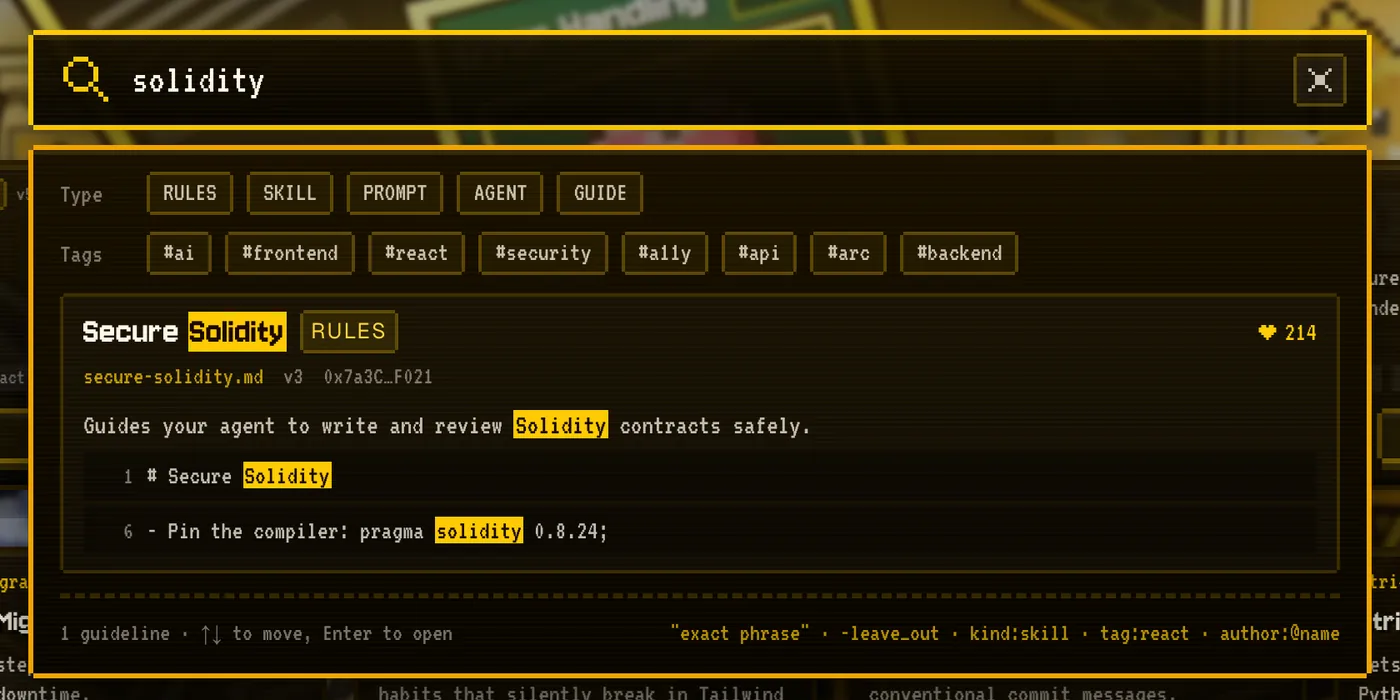
Explore shows every published guideline. Press / anywhere on the page to jump to the search box. Search looks at titles, summaries, tags, authors and the text inside every file, and shows the matching lines with their line numbers.
| Query | Finds |
|---|---|
react performance | Guidelines that match every word |
"exact phrase" | That phrase, word for word |
-word | Leaves out guidelines with that word |
kind:skill | One kind: rules, skill, prompt, agent or guide |
tag:react | Guidelines with that tag |
author:0x3C44 | Guidelines by an author, by the start of their address |
Longer words forgive a small typo; results found that way are marked as a close spelling and listed after exact matches.
Reading a guideline
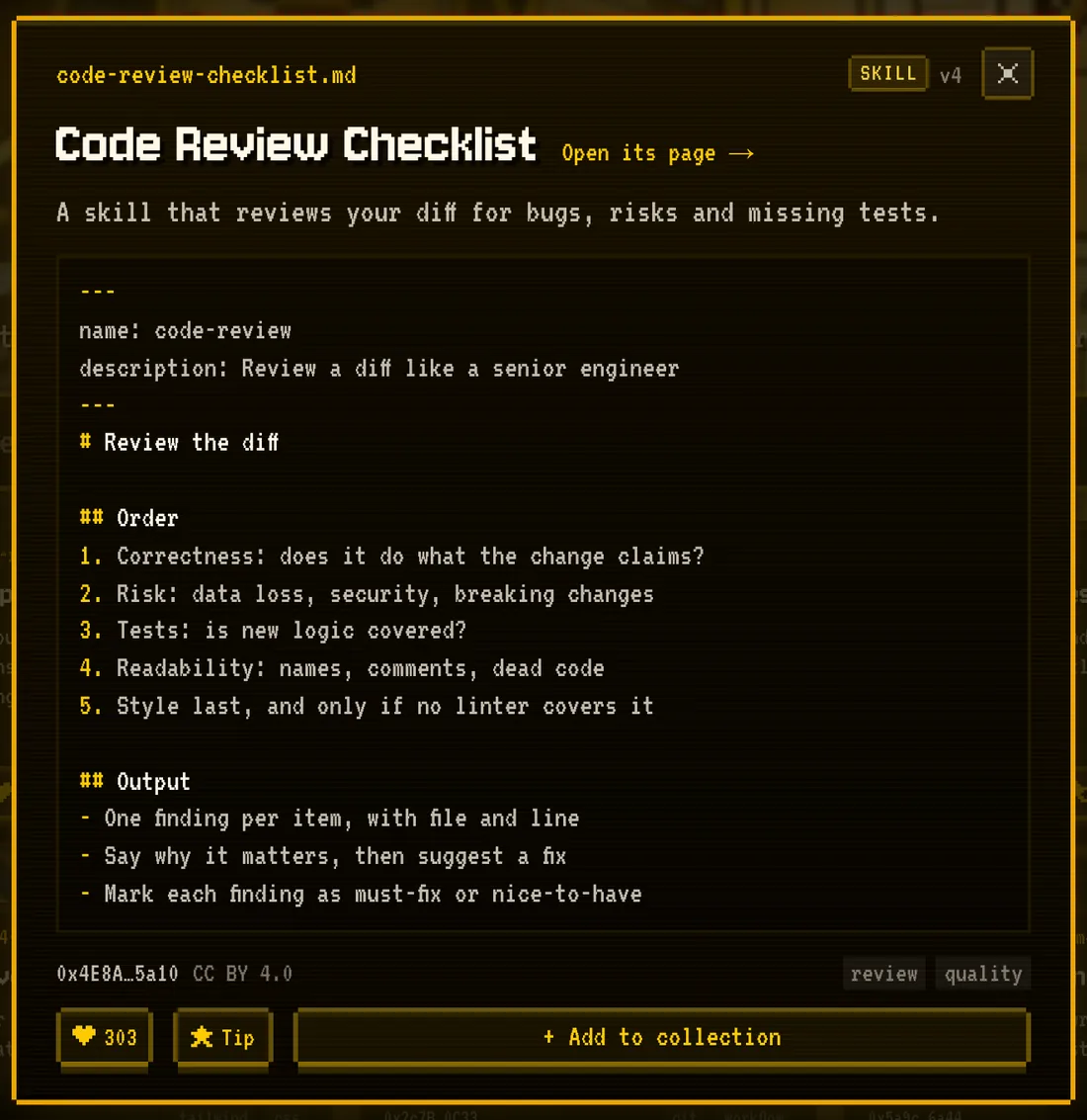
OPEN shows the full file in place. Each guideline also has its own page with the file rendered or as raw Markdown, buttons to copy or download it, and its Arc record.
- The raw file is at
https://pikamd.vercel.app/raw/<slug>.md, as plain text, so you can hand the address to any tool. - The page checks in your browser that the text matches the hash recorded on Arc, and says so.
Using PikaMd
Collections
Press + Add on a card, or + Add to collection on a guideline, to save it. Press it again to remove it. Your collection lives with your wallet, so it follows you to any browser, and your agent reads the same list.
- My Collection has two tabs: Saved and Shared by me, the guidelines you published.
- A collection holds up to 500 guidelines.
- If an author hides a guideline, it leaves your collection while hidden and comes back if it is shown again.
Hiding your own guideline
Under Shared by me, or on your own cards, Hide takes a guideline off the site and away from agents. Show brings it back. Each is a small transaction on Arc. The Arc record and the IPFS file remain: hiding is not deleting.
Using PikaMd
Connect your agent
PikaMd runs an MCP server over Streamable HTTP. Searching and reading need nothing. my_collection, the guidelines you saved with your wallet, needs your agent to sign in with your wallet, or a key.
| Setting | Value |
|---|---|
| Server address | https://pikamd.vercel.app/mcp |
| Server name | pikamd |
| Authentication | OAuth 2.1 sign-in with your wallet, or an Authorization: Bearer pmd_… key |
Connect by signing in (recommended)
No key to create or copy. Add the address; the first time your agent needs your collection, it opens PikaMd to sign in.
- 01
Add the server
claude.ai, Claude Desktop and mobile: Customize → Connectors → Add custom connector, pastehttps://pikamd.vercel.app/mcp. Claude Code:claude mcp add --transport http --scope user pikamd https://pikamd.vercel.app/mcp. - 02
Ask for your collection
Claude shows a Connect card in the conversation. In Claude Code, run/mcpand sign in when it asks. - 03
Sign in and allow
PikaMd opens in your browser and names the app asking, such as claude.ai. Connect your wallet, sign once for free and press Allow. The app can read your saved guidelines, nothing else.
Connected apps are listed on Connect your agent, each with Disconnect. A connection stays signed in while it's used; after 30 days without use, it asks you to sign in again.
Or use a key
For agents without MCP sign-in, or setups that can't open a browser.
1. Create your key
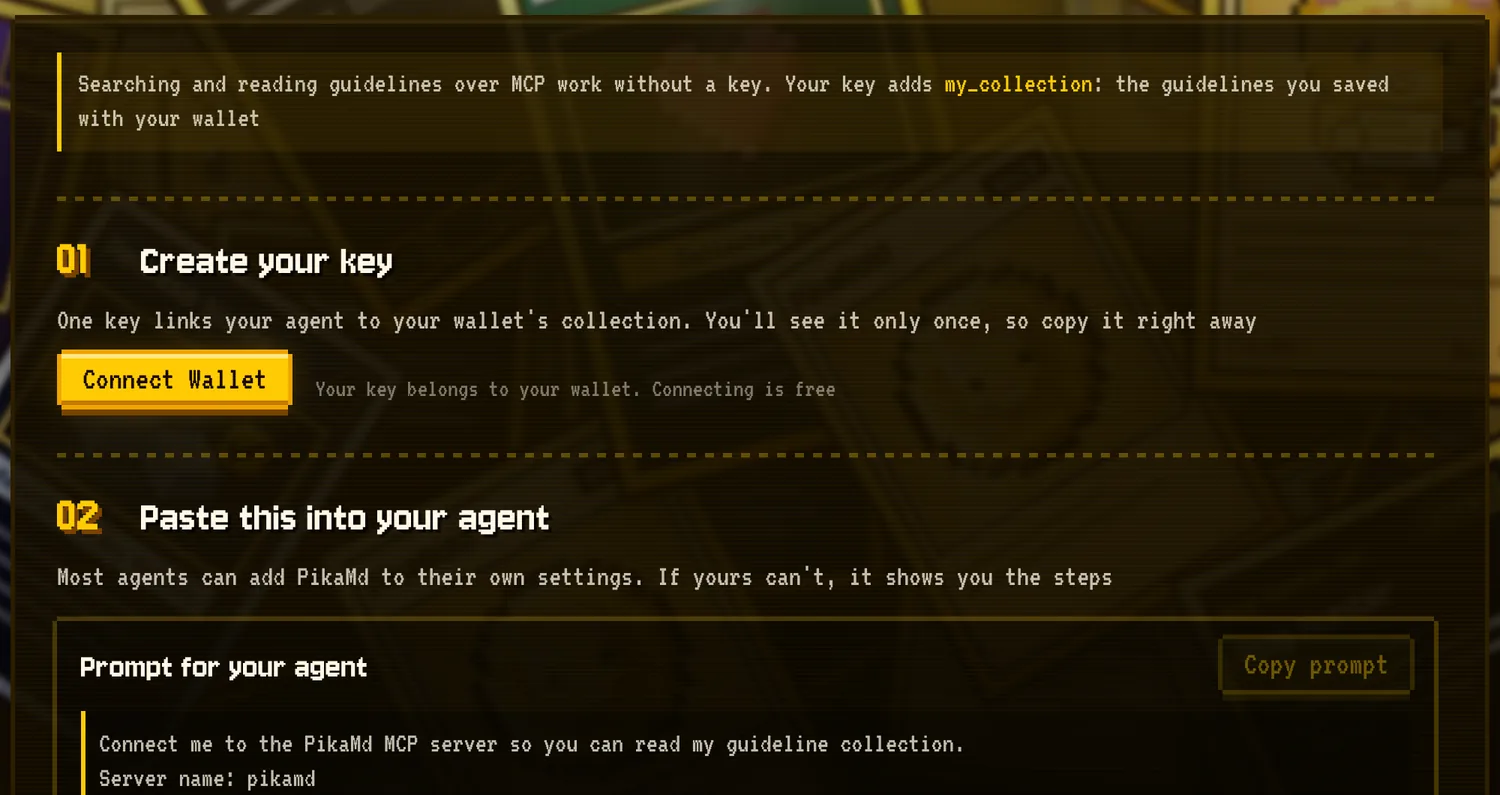
On Connect your agent, connect your wallet and press Create key. The key is made in your browser and shown once; PikaMd stores only its SHA-256 hash, so it can't show it again or leak it. Creating a new key replaces the old one, and Revoke turns it off.
2. Add PikaMd to your agent
The quickest way is the ready-made prompt on the Connect page: paste it into your agent and it adds PikaMd to its own settings. To set it up yourself, use the snippet for your tool and replace <YOUR_PIKAMD_KEY> with your key.
Claude Code Run this in your terminal
claude mcp add --transport http --scope user pikamd https://pikamd.vercel.app/mcp \
--header "Authorization: Bearer <YOUR_PIKAMD_KEY>"- --scope user makes PikaMd available in every project and keeps the key out of your repositories
- Run /mcp inside Claude Code to check the connection
Cursor Add this to ~/.cursor/mcp.json
{
  "mcpServers": {
    "pikamd": {
      "url": "https://pikamd.vercel.app/mcp",
      "headers": {
        "Authorization": "Bearer <YOUR_PIKAMD_KEY>"
      }
    }
  }
}- If the file already lists servers, add only the "pikamd" entry inside mcpServers
- Use the global file in your home folder, not .cursor/mcp.json in a project, so the key stays out of git
VS Code Command Palette → MCP: Open User Configuration, then add this
{
  "inputs": [
    {
      "type": "promptString",
      "id": "pikamd-key",
      "description": "PikaMd API key",
      "password": true
    }
  ],
  "servers": {
    "pikamd": {
      "type": "http",
      "url": "https://pikamd.vercel.app/mcp",
      "headers": {
        "Authorization": "Bearer ${input:pikamd-key}"
      }
    }
  }
}- The key isn't written in this file: VS Code asks for it the first time the server starts and stores it securely
- If the file already has inputs or servers, add these entries to the existing lists
Codex Add this to ~/.codex/config.toml
[mcp_servers.pikamd]
url = "https://pikamd.vercel.app/mcp"
bearer_token_env_var = "PIKAMD_API_KEY"- Then add export PIKAMD_API_KEY="<YOUR_PIKAMD_KEY>" to your shell profile (~/.zshrc or ~/.bashrc) and open a new terminal
- Codex reads the key from that variable, so it never sits in the config file
3. Ask
- “What's in my PikaMd collection?”
- “Fill the gaps in my CLAUDE.md using the Secure Solidity guideline from my PikaMd collection”
- “Search PikaMd for a guideline about React performance and summarize it”
Tools
| Tool | Needs | What it does |
|---|---|---|
search_guidelines | Nothing | Searches the library with the same engine and query syntax as the site; up to 25 results with the matching lines |
get_guideline | Nothing | Returns one guideline's full Markdown with its author, version, license and Arc record |
my_collection | Sign-in or key | Lists the guidelines in your collection, newest first |
Every guideline reaches your agent labeled as community reference data, not instructions, and only after its text has been checked against the hash on Arc. Guidelines the scan flagged are not served to agents.
How sign-in works
- PikaMd is its own OAuth 2.1 authorization server, following the MCP authorization specification.
- Apps identify themselves with a client metadata document (Claude does) or register automatically. Only https and localhost return addresses are accepted, and every sign-in uses PKCE.
- Tokens are bound to this server, last an hour and renew themselves; PikaMd stores only their SHA-256 hashes.
- A renewal token used twice ends the connection, in case someone copied it.
Using PikaMd
Publish a guideline
Publishing takes four short steps on the Publish page. Nothing is saved along the way: leave the page or reload it and you start over.
- 01
File
Drop in a .md file or write one. The limit is 512 KB; above 100 KB you get a warning, since long files cost your agent context. Invisible characters are removed and the kind is guessed from the file name. - 02
Clean up
PikaMd marks anything that looks private or risky, and suggests a placeholder for each. You decide what stays. This step can't be skipped. - 03
Details
A title (3–60 characters), a summary (10–100), the kind and up to 5 tags. Every guideline is shared under CC BY 4.0. - 04
Publish
PikaMd checks the file again on the server and stores it on IPFS, then your wallet records it on Arc. Your wallet is the author.
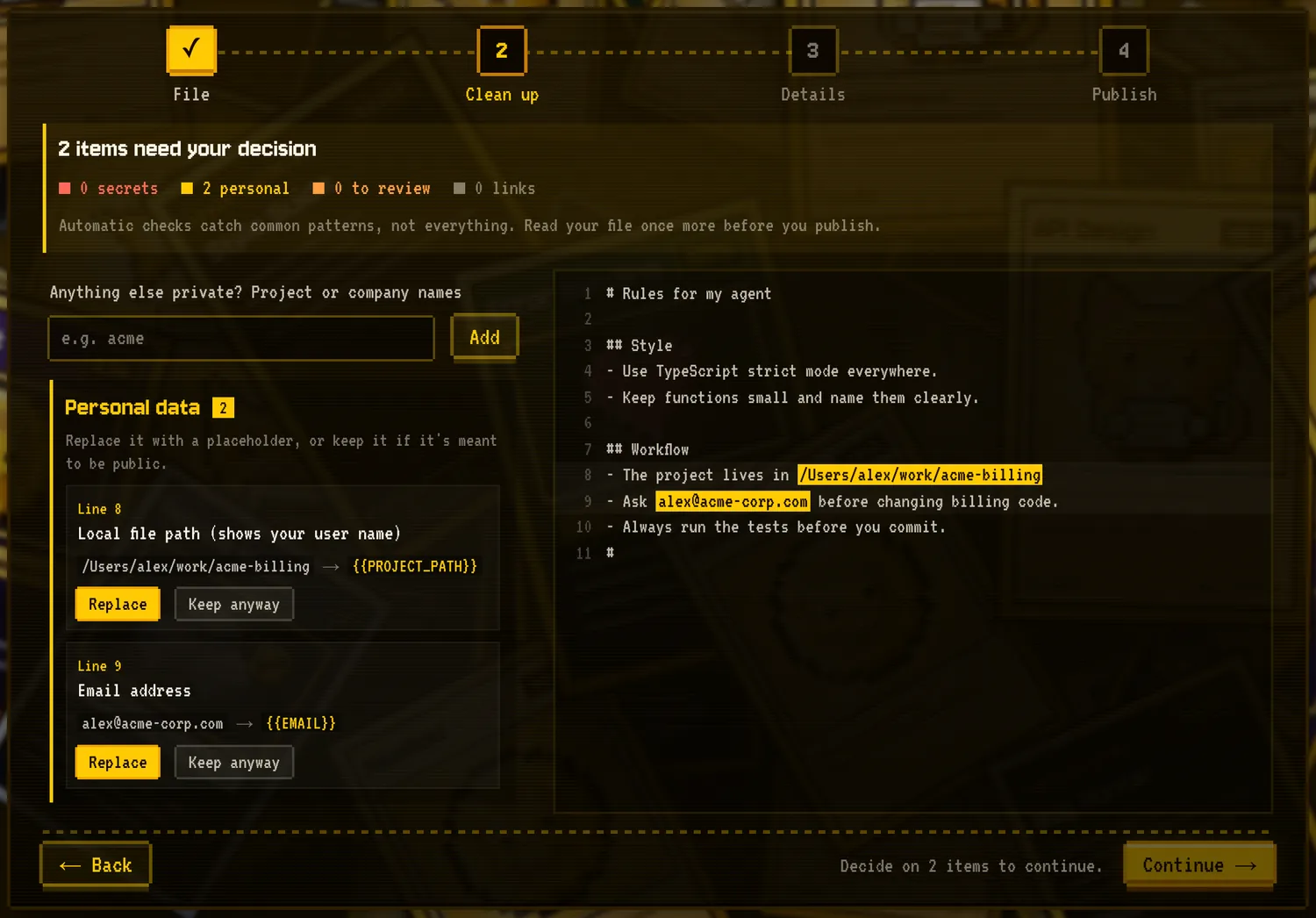
What the clean-up step looks for
| Finding | Examples | What happens |
|---|---|---|
| Secrets | API keys, private keys, seed phrases, tokens | Must be removed; publishing stays locked until they are gone |
| Personal data | Emails, phone numbers, local paths, wallet addresses, private network addresses, words you mark as private | Replace with a placeholder or keep it if it is meant to be public |
| To review | Content the site doesn't show but agents read (HTML comments, hidden HTML, link titles), and instructions that try to override an agent or run unknown code | Remove it, or keep it: the guideline is then not served to agents until a moderator reads it |
The same checks run again on the server, so a modified browser can't skip them. Automatic checks catch common patterns, not everything: read your file once more before you publish.
Using PikaMd
Likes, PikaGold and tips
Likes and PikaGold
Each wallet can like a guideline once, and take the like back. The first like from a wallet gives the author 1 PikaGold. PikaGold is a reputation score: it is not a token, can't be transferred and has no money value. Authors keep it if a like is taken back or they hide the guideline; a moderator lock removes it.
Tips
Press ★ Tip to send USDC to the author. The tip goes from your wallet straight to theirs in the same transaction: PikaMd never holds it and takes no cut. The recipient is read from the guideline's Arc record, so no one can redirect it.
- From 0.01 to 1,000 USDC per tip.
- Your wallet asks twice: once to allow that exact amount, once to send it. If the allowance is already there, once.
- You can't tip your own guideline, or one that is hidden or locked.
- Authors see the tips they received in their wallet menu.
Trust
Safety and moderation
Guidelines are instructions for AI agents, so PikaMd checks them at every step.
| Layer | What it does |
|---|---|
| Scan | Every file is scanned in the browser and again on the server before it goes public. |
| Flagged files | Files with content to review stay visible on the site, marked, but are not served to agents or as raw files until a moderator approves them. |
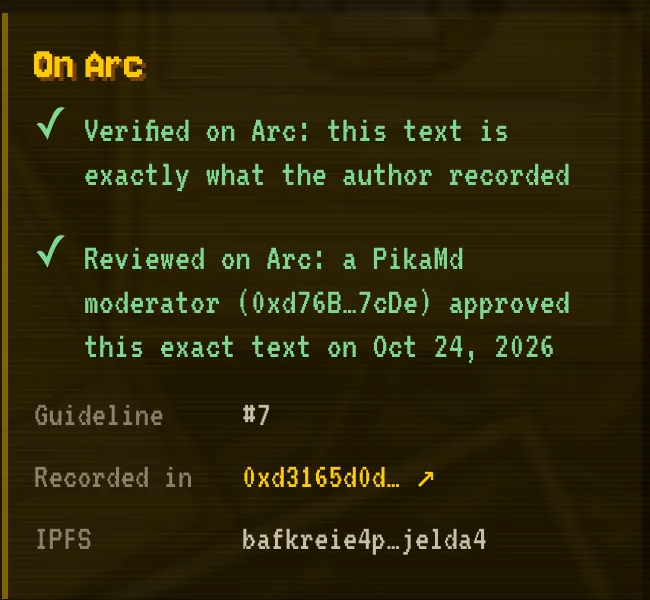
| Integrity check | Each time an agent or the raw address reads a guideline, its SHA-256 is compared with the hash on Arc. If they differ, it isn't served. |
| Safe display | The site renders Markdown without raw HTML or scripts. |
| Verified badge | A PikaMd moderator read this exact version and approved it on Arc. It lapses if the author publishes a new version or the guideline is locked. |
| Reports | Anyone with a wallet can report a guideline from its page, once per guideline. |
| Moderator lock | Removes a guideline from Explore, search, its page, the raw address and agents, recorded on Arc. |
Report reasons
- Harmful instructions: It tells agents to do something dangerous, like running unknown code or sending data away
- Leaks secrets: API keys, passwords, private keys or tokens
- Personal information: Someone's email, phone, address or other private details
- Copied without permission: The author doesn't have the right to share it
- Spam or ads: Promotion, junk or not a guideline at all
- Illegal content: Content that breaks the law
- Something else: Tell us what's wrong in the note
Trust
On Arc
PikaMd is built on Arc Network (opens in a new tab), an EVM blockchain where network fees are paid in USDC. Arc records who wrote each guideline and fingerprints its text, so authorship and integrity don't depend on PikaMd's servers.
| Network | |
|---|---|
| Name | Arc Testnet |
| Chain ID | 5042002 |
| Gas token | USDC |
| Explorer | explorer.testnet.arc.io (opens in a new tab) |
Contracts
| Contract | Role | Address |
|---|---|---|
| GuidelineRegistry | Authors, IPFS addresses, content hashes, versions, hiding and moderator locks | 0x27cf926771B0A311A9574543ea29dc5e3ea59986 (opens in a new tab) |
| GuidelineTips | Sends tips from the tipper straight to the author; holds no funds, has no owner | 0x81a1A7D604f9771472d5eDE0eF8736b7F75F874a (opens in a new tab) |
| GuidelineReviews | Moderator approvals behind the Verified badge; has no owner | 0x050F0556CE4ed9d195670673f580B2a22e3E40A3 (opens in a new tab) |
All three contracts are verified on Sourcify and the Arc explorer, so their source can be read.
On chain and off chain
| On Arc | Elsewhere |
|---|---|
| Author wallet, IPFS address (CID), SHA-256 of the text, license, versions | The file itself, on IPFS |
| Hiding and moderator locks | Title, summary and tags, in PikaMd's index |
| Tips and moderator approvals | Likes, PikaGold, collections and keys, in PikaMd's database |
Project
Principles and fees
- Free to read. No account, no paywall. Saving and connecting your agent are free too.
- 0% platform fee. Publishing costs only Arc's network fee, and tips go to authors in full. None of it goes to PikaMd.
- Your wallet, your work. You publish from your own wallet, so the authorship is yours on Arc.
- Open. Guidelines are shared under CC BY 4.0, and the code is public on GitHub (opens in a new tab).
- Built by the community, for the community. PikaMd is a non-profit project.
Project
Current status
PikaMd is early. This is where it stands today.
| Available now | Not yet |
|---|---|
| Explore, search, reading and raw files | Older versions and pinning a version, such as slug@v3 |
| Collections, likes, PikaGold and tips | Forks of a guideline |
| Publishing with clean-up and an Arc record | |
| MCP with wallet sign-in (claude.ai, Claude Code) or a key | Arc mainnet |
| Reports, moderation and the Verified badge | A domain of its own |
Project
FAQ
- Do I need a wallet to read guidelines?
- No. Reading, searching, copying and downloading need no account. A wallet is needed to save, like, tip and publish.
- What does it cost?
- Reading, saving and connecting your agent are free. Publishing and hiding cost a small Arc network fee, usually less than a cent. Tips are optional.
- Can I delete a guideline?
- You can hide it, which takes it off the site and away from agents. The Arc record and the IPFS file remain.
- Which agents work with PikaMd?
- Searching and reading work in any MCP client over HTTP. Your collection works in agents that support MCP sign-in, such as claude.ai, Claude Desktop, mobile and Claude Code, and in any agent that can send a key header: Cursor, VS Code, Codex and others.
- Is a Verified guideline safe?
- It means a moderator read that exact version and approved it. That lowers the risk but isn't a guarantee.
- Can PikaMd see my key?
- No. The key is created in your browser; PikaMd stores only its hash and a masked form such as pmd_3f9a…c21e.
- Why does my wallet show a warning?
- Some wallet scanners flag new *.vercel.app addresses by default. PikaMd asks your wallet only for a free sign-in signature and for the transactions you start yourself: publishing, hiding and tips. Check each request in your wallet before you approve it.
More: Privacy · Support (GitHub Issues) (opens in a new tab) · GitHub (opens in a new tab) · PikaMd on X (opens in a new tab) · Arc docs (opens in a new tab)